Institution:Bronx Community College
Course: DAT 47 – Java Programming
Prerequisites: DAT 30 or Departmental Permission
Hours: 4
Credits: 3
| Name: | Chufeng Jiang |
| Email: | |
| Phone: | +1-9258609229 |
| Office Location: | Zoom |
| Office Days/Hours: | Tue | Thu: |
| Admin. Assist.: | Marisol Rodriguez |
| Office Location: | Meister Hall (ME) – G20 |
| Email: | [email protected] |
| Phone: | 718-289-5594 |
| Office Hours: | Monday-Friday 9am – 5pm |
Getting Ready for Online Learning:
- It is strongly recommended that you check the resources available on the college website: https://www.bcc.cuny.edu/academics/distance-learning/
Course Structure:
- Instruction of this course will be 100% Synchronous online through the course management system, Brightspace, or another online video conferencing software/app (i.e. Zoom).
- You will use your CUNYFirst account credential to login to the course from the Brightspace Login Page.
- On Brightspace, you will access online lessons, course materials, and resources. You will participate in activities that consist of discussion forums, online virtual lessons, and email communication.
Course Instruction – Synchronously:
- Instruction of this course will be 100% synchronous, real-time, through virtual meetings and/or online activities. The class will meet weekly according to the posted CUNYFirst schedule.
- All of the coursework, including exams, is done online. There may be additional virtual meetings and/or assignments communicated by the instructor via the course syllabus and/or via Brightspace.
Course Description:
- The purpose of this course is to introduce students to the Java programming language, a powerful, platform- independent language used in the design and implementation of client/server applications. This course is an introduction to object-oriented programming using Java. It assumes no prior programming experience, but the student must have taken at least three years of high school mathematics and DAT 30. The course covers the basic constructs and syntax of Java and includes the following topics: standard Java classes and packages, Java methods, decision statements, loops, arrays, and input/output structures.
- The course will also prepare the students to take the Java credential offered by w3schools.com.
Student Learning Outcomes:
- Upon completion of this course, students should be able to:
- Understand Java program development environments (Borland JBuilder, Microsoft Visual J++, TextPad and JDK).
- Create simple Java Applications and Applets, use input and output statements, declare Java data types, and use arithmetic operators.
- Write decision-making statements and use relational and equality operators (if, if/else, switch and nested if/else statements).
- Utilize logical operators (AND, OR and NOT).
- Develop repetition structure (for, while and do/while loops) in Java Applications and Applets.
- Demonstrate how to construct programs modularly from small pieces called methods and able to create new methods.
- Develop an understanding of how to declare an Array, initialize an array and refer to individual elements of an array.
- Learn to Pass arrays to methods and understand the use of arrays to store, sort and search lists of values.
- Develop Object-Oriented Programming (OOP) skills to write and debug programs and build business applications in Java.
Netiquette Guidelines:
- Netiquette is a set of rules for behaving properly online. Your instructor and fellow students wish to foster a safe online learning environment. All opinions and experiences, no matter how different or controversial they may be perceived, must be respected in the tolerant spirit of academic discourse. You are encouraged to comment, question, or critique an idea but you are not to attack an individual. Working as a community of learners, we can build a polite and respectful course community.
- The following netiquette tips will enhance the learning experience for everyone in the course:
- Do not dominate any discussion.
- Give other students the opportunity to join in the discussion.
- Do not use offensive language. Present ideas appropriately.
- Be cautious in using Internet language. For example, do not capitalize all letters since this suggests shouting.
- Popular emoticons can be helpful to convey your tone but do not overdo or overuse them.
- Avoid using vernacular and/or slang language. This could possibly lead to misinterpretation.
- Never make fun of someone’s ability to read or write.
- Share tips with other students.
- Keep an “open-mind” and be willing to express even your minority opinion. Minority opinions have to be respected.
- Think and edit before you push the “Send” button.
- Do not hesitate to ask for feedback.
- Using humor is acceptable but do not overdo it.
Evaluation and Grading
| Graded Activities | Percent of Final Grade |
| 3 Exams | 35% |
| Final Exam | 20% |
| Homework Assignments | 20% |
| W3schools.com Credential | 5% |
| Class Participation/Attendance | 10% |
| Discussion Board | 5% |
| Group Assignment | 5% |
| Total | 100% |
Mandatory credential: Java Credentials by W3schools.com – When you pass the credential certification exam, take a screenshot and email it to me before the final exam date.
Extra-Credit Policy
There will be no opportunities for extra credit in this course. This approach is intended to maintain fairness and uniformity across all students within the department. The focus should remain on completing the regular coursework, including assignments, quizzes, exams, etc. by their respective deadlines.
In Class Examinations
Announced examinations will be conducted 3 times during the semester. NO EXAM GRADE WILL BE DROPPED. Cell phones, smartwatches, etc. calculators are not allowed to be used in the classroom.
Incomplete (INC) Grades
INC grades are given only to students who are passing the course and are unable to complete the final examination and/or the mandatory Class Project Questions due to circumstances beyond their control (e.g., illness, accident). The assignment of an INC is governed by College policy and requires consultation with, and mutual agreement between, the student and the instructor prior to the submission of final grades at the end of the semester.
INC grades are not automatically assigned. In the absence of such agreement, a zero will be recorded for any incomplete work, and the student will receive an academic grade based on the final grade calculation.
Make-up Class Examinations:
Generally, there are no make-up examinations given. If you miss an exam due to unforeseen circumstances (illness, accident, etc.), notify the instructor as soon as possible and discuss with the instructor to determine if an acceptable alternative is possible.
Verifiable documentation (e.g. physician’s certification, etc.) is required.
Final Examination:
The Final Exam is scheduled by the Registrar’s Office. Please check the Academic Calendar at for the Final Exam period. Therefore, do NOT make vacation plans, etc. during this time-period. Final exam will ONLY be given, as assigned, by the Registrar’s Office.
Exam Expectations
All exams are closed books, closed notes, no PowerPoint slides, no searches on the internet for the answers, working with anyone during the exams, etc.
Discussion Board
In distance education courses you are required to be engaged in the discussions just as if you were in a face- to-face course. This means that in order to receive full credit for participation for discussion board activities, you will need to participate during the online virtual class sessions and on the Discussion Board.
The Discussion Board postings are a way for you to engage with each other about the course content. Each lesson module will have a question that links to a forum. You can also access each forum by clicking on the “Discussion” button in the course navigation links. To get full credit for each discussion, you will need to post one thoughtful, well-written response to the question and respond to two of your classmates’ answers
W3schools.com Certification Exams:
It will be a big benefit for our students to start and grow your IT career in web development.
– Students can take a certification exam(s) on the last day of class: Java
– Students are ready to register and take it with an extra fee ($95/each certification exam).
– The college will cover the cost for one certification.
Attendance/Participation:
Class attendance and participation are significant components of the learning process and play a major role in determining overall student academic success. Due to the hands-on nature of programming, you should make every effort to attend each class on time, as it is very difficult to catch up later. Therefore, students are strongly encouraged to attend and participate in all class sessions.
Absences will adversely affect a student’s final grade. For every 2 absences, students will lose 1% of the 10% attendance/class participation grade. Lateness is very distracting to the class, and it will affect your attendance/class participation grade as well. Every 2 lateness equals to 1 absence.
Virtual Office Hours:
Every week, I will be available for office hours. We will discuss the time and day once class commences.
Accommodations/Disabilities:
BCC respects and welcomes students of all backgrounds and abilities. In the event you encounter any barrier(s) to full participation in this course due to the impact of a disability, please contact Disability Services as soon as possible this semester. The Disability Services specialists will meet with you to discuss the barriers you are experiencing and explain the eligibility process for establishing academic accommodations for this course. You can reach Disability Services by email at [email protected] or at Loew Hall, Room 211, or by calling at (718) 289-5874.
Policy on Academic Integrity:
Bronx Community College has no tolerance for acts of scholastic dishonesty. The responsibilities of both students and faculty with regard to scholastic dishonesty are described in detail in the CUNY Policy on Academic Integrity, https://www.cuny.edu/about/administration/offices/legal-affairs/policies- resources/academic-integrity-policy/
By enrolling in this class, you have agreed to observe all student responsibilities described in this document. Students who violate College rules on academic integrity are subject to disciplinary penalties ranging from failure in the course to dismissal from the College. Since dishonesty harms the individual, all students and the integrity of the College, policies on academic integrity will be strictly enforced.
The use of Artificial Intelligence (AI) in this course:
- In addition to CUNY’s Academic Integrity Policy (https://www.cuny.edu/about/administration/offices/legal- affairs/policies-resources/academic-integrity-policy/), the following represents the AI excerpts including in the policy:
- Cheating is the unauthorized use or attempted use of material, information, notes, study aids, devices, artificial intelligence (AI) systems, or communication during an academic exercise. Example of cheating include: Copying from another person or from a generative AI system or allowing others to copy work submitted for credit or a grade. This includes uploading work or submitting class assignments or exams to third party platforms and websites beyond those assigned for the class, such as commercial homework aggregators, without the proper authorization of a professor. Any use of generative AI tools must be in line with the usage policy for specific assignments as defined in the course of the syllabus and/or communicated by the course instructor.
- Using artificial intelligence (AI) tools to generate content for assignments or exams, including but not limited to language models or code generators, without written authorization from the instructor.
- Submitting content generated by another person or an AI tool or any other source as solely your own work as your own, including, but not limited to, material obtained in whole or in part from commercial study or homework help websites, or content generated or altered by AI or digital paraphrasing tools without proper citation.
- Plagiarism is the act of presenting ideas, research or writing that is not your own as your own. Examples of plagiarism include: Copying another person’s or an AI tool’s actual words or images without the use of quotation marks and citations attributing the words to their source.
- Unauthorized use of AI-generated content; or use of AI-generated content, whether in whole or in part, even when paraphrased, without citing the AI as the source.
EXPLANATION Revision to the 2022 Academic Integrity Policy is necessary because the current policy does not address the advent of Artificial Intelligence and its use by students at CUNY. Preparing students to learn from and use AI responsibly and ethically is critical to the University’s mission, to ensuring academic integrity, to securing the rigor of the University’s academic programs. Further, students must become facile with the use of AI to learn effectively in today’s world and to prepare for their AI-assisted careers and lives in the future. Cell Phones, PDA’s, Etc.
Cell Phones, Smartphones, Smartwatches, and other PDA’s: Cell phones, smartphones, smartwatches, and other PDA’s (personal digital assistant) are not allowed to be used as calculators during class or on exams. In fact, all cell phones and other PDAs are to be TURNED OFF BEFORE class starts and to be put away. This means that it should not be on your desk or in your immediate vicinity.
Note: Points off the final grade will be deducted for the usage of these devices at the discretion of the instructor. The instructor will let you know of his/her policy.
Evaluation & Requirements of Students – Conduct of the course:
- During the class session, students will learn theory of programming and its application to practical programming problems. Classes will consist of part lecture and part class discussion. It is expected of every student to read the text prior to attending each class session. This is necessary so that students can participate in the class discussion.
- Homework assignments are expected to be completed on time. No LATE homework assignments will be accepted. Students are encouraged to ask questions on any matters that are not clear to.
Recording of Remote Classes:
Students who participate in this class with their camera on or use a profile image are agreeing to have their video or image recorded solely for the purpose of creating a record for students enrolled in the class to refer to, including those enrolled students who are unable to attend live. If you are unwilling to consent to have your profile or video image recorded, be sure to keep your camera off and do not use a profile image.
Likewise, students who un-mute during class and participate orally are agreeing to have their voices recorded. If you are not willing to consent to have your voice recorded during class, you will need to keep your mute button activated and communicate exclusively using the “chat” feature, which allows students to type questions and comments live.
- Camera on Policy:
- Students are required to turn on their cameras and remain visibly present on-screen in online and hybrid courses during class periods or for remote testing purposes, as required by your instructor.
- The use of cameras is an important pedagogically to increase engagement, social connection, accountability, and collaboration. Moreover, in testing situations, cameras are essential to ensuring the integrity of the testing environment.
Brightspace Note to Students: Tips
- Be aware of your surroundings.
- Your professor and classmates can also see BEHIND you. Make sure that there is nothing in the background (traffic, other people, a pile of laundry) that may distract from the class. While it is not necessarily the best choice to attend class from your messy bedroom, it may be the only place you can find peace and quiet away from roommates or family members. If that is the case, you can employ a Virtual Background to hide what youdo not want seen.
- Mute is your friend.
- Once you log in to the virtual classroom, be sure to mute your microphone (lower lefthand corner). This will help to eliminate background noise that could distract others.
- Raise your hand and wait to be called upon.
- If you wish to speak, either physically raise your hand or use the “Raise Hand” button at the center of the bottom of your screen. Once the professor calls on you, unmute yourself and begin speaking. When you have finished speaking, indicate you are done by saying something like “That’s all” or “Thank you” and then mute your microphone again.
- If you do not have anything nice to say…
- The Zoom chat feature is a tool to make comments and ask questions without interrupting the speaker but be aware that your comments are public and are recorded in the minutes of the session.
- Clothing is NOT optional.
- Remember that, even though you may be alone at home, your professor, and classmates can SEE you! While attending class in your pajama bottoms is a tempting option, you want to make sure that you are presenting yourself in the best possible light at least from the waist up.
These tips should be used across any virtual video conference application in use for the class.
COURSE CONTENT
Course Materials:
Required Textbook:
- Java How to Program, Deitel H. M. & Deitel, 11th Ed. Upper Saddle River, NJ Prentice Hall 2018 ISBN: 978-0-13-474335-6.
- The Java Tutorial, http://java.sun.com/docs/books/tutorial/index.html
Software (select one from 1-3, select one from 4-6, and one (7) is required):
- IntelliJ Idea (Recommend, our class demo will use this)
- Visual Studio Code
- Eclipse IDE
- Command Prompt (Recommend for win10)
- Power-Shell
- Terminal (Recommend for mac os and linux, or win11)
- Git (Required)
Other Materials:
Bring (Optional): (1) Textbooks to each class session, (2) A flash drive.
Preparation
- Install JDK 21.
A windows 11 installation guide can be downloaded here Installation Guide . If you are using other types of systems, please refer to the following videos to complete the installation process:
– windows10: How to Install Java JDK 20 on Windows 10
– mac os: How to Install Java JDK 21 on Mac | Amit Thinks
– linux: How to Install JDK 21 on Ubuntu 22.04 (2024)
For windows users, you have to make sure that JAVA PATH and CLASS PATH has been set successfully:
For example: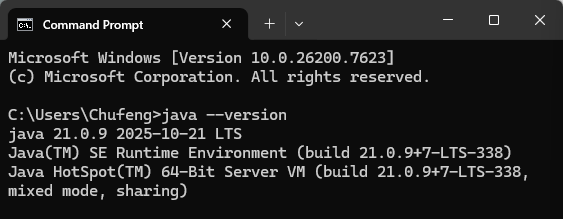
If not, please refer to the following video:
– windows10: Set Path of JDK in Java (windows10)
– windows11: please refer to the installation guide.
- Install IntelliJ IDEA, Community version is enough.
– windows10/11: How to Install Intellij IDEA on Windows 11 (Updated 2025) | Amit thinks (From 3:18″)
– mac os: How to Install IntelliJ IDEA on Mac | Install IntelliJ IDEA IDE on macOS (2026)
– linux: How to Install IntelliJ IDEA IDE on Ubuntu 24.04 LTS Linux
- Install IntelliJ IDEA Plugins (Optional but recommend)
– Rainbow Brackets
– Indent Rainbow
| Week | Chapter | Date | Subject Matter |
| 1 | 2 | Jan. 27, 2026 Jan. 29, 2026 |
Java programming • Write simple Java applications. • Use input and output statements. • Use Arithmetic operators • Use Equality and relational operators • Hands-on in-class lab exercises |
| 2 | 2 | Feb. 3, 2026 |
• Homework Review • Chapter 2 Lab Excercise |
| 2 | 3 | Feb.5, 2026 |
Classes and Objects • Initializing Objects with Constructors. • Instance variables, set and get methods. |
| 3 | 1 | Feb.10, 2026 |
Introduction to Computers, the Internet and Java • Learn about exciting recent developments in the computer field. • Learn computer hardware, software, and networking basics. • Understand the data hierarchy |
| 4 | Feb. 19, 2026 |
• Homework Review • Chapter 3 Lab Excercise |
|
| 5 | Feb. 24, 2026 | Examination #1 and Review | |
| 5 | 4 | Feb. 26, 2026 |
Control Statements: Part1 • Use the if and if-else selection statements • Use the while and do/while repetition statement • How to write a proposal using latex |
| 6 | 5 | Mar. 3, 2026 |
Control Statements: Part 2: Logical Operators • Use the for and do/while repetition statement • Understand switch selection statement • How to use break and continue statement • How to use logical operators • Export JavaDoc using InteliJ Idea. |
| 6 | 5 | Mar. 5, 2026 |
• Homework Review • Chapter 4-5 Lab Excercise |
| 7 | Mar. 10, 2026 |
• Introduction to W3schools.com credentials • Extra Lab Excercise Review |
|
| 7 | Mar. 12, 2026 | Examination #2 (Midterm) and Review | |
| 8 | 6 | Mar. 17, 2026 |
Methods: A Deeper Look • Static methods and static variables • Program Modules in Java • Declaring and Using Methods • Method-call and stack and stack frames • How to write a project report? |
| 8 | 7 | Mar. 19, 2026 |
Arrays and Array Lists • Declare and initialize arrays • Passing arrays to methods • Multidimensional arrays |
| 9 | 7 | Mar. 24, 2026 |
• Homework Review • Chapter 6-7 Lab Excercise |
| 10 | 8 | Mar. 31, 2026 |
• OOP Programming • Encapsulation and data hiding. • The notions of data abstraction and abstract data types (ADTs). • To use keyword this. • To use static variables and methods. |
| 11 | Apr. 1-9,2026 | Spring Recess | |
| 12 | 8 | Apr. 14, 2026 |
• Homework Review • Chapter 8 Lab Excercise |
| 12 | Apr. 16,2026 | Examination #3 and Review | |
| 13 | 8 | Apr. 21, 202 |
• Abstract Data types (ADTs) • OOP Programming |
| 13 | 8 | Apr. 23, 202 |
• Abstract Data types (ADTs) • Lab Excercise |
| 14 | 11 | Apr. 28, 202 | • Exeption Handling |
| 14 | 15 | Apr. 30, 202 | • Files, Streams, and Object Serialization |
| 15 | May. 5, 2026 |
• Homework Review • Chapter 11 & 15 Lab Excercise |
|
| 15 | May. 7, 2026 | Review for Final Exam | |
| 16 | May. 12, 2026 | No Course Scheduled | W3schools.com Certification Exams |
|
| 16 | May. 14, 2026 | Final Examination |

